Appearance
MC内网穿透教程
下载frp工具地址:https://github.com/fatedier/frp
windows客户端
启动命令
powershell
./frpc -c frpc.tomlfrpc.toml填入
toml
serverAddr = "xxx.xxx.xxx.xxx"
serverPort = 7000

[[proxies]]
name = "mc-tcp"
type = "tcp"
localIP = "127.0.0.1"
localPort = 25565
remotePort = 25565

[[proxies]]
name = "mc-udp"
type = "udp"
localIP = "127.0.0.1"
localPort = 24454
remotePort = 24454
linux服务端
启动命令
bash
./frps -c frps.tomltoml
[common]
bind_port = 7000
✅ 怎么让 frps 不受 SSH 断开影响
方案1(最推荐):用 systemd(长期稳定运行)
在 Linux 上把 frp 当服务跑。
1️⃣ 创建服务文件
sudo nano /etc/systemd/system/frps.service内容:
[Unit]
Description=frp server
After=network.target

[Service]
Type=simple
ExecStart=/你的路径/frps -c /你的路径/frps.toml
Restart=always
RestartSec=5

[Install]
WantedBy=multi-user.target
2️⃣ 启动并设置开机自启
sudo systemctl daemon-reexec
sudo systemctl daemon-reload
sudo systemctl start frps
sudo systemctl enable frps
3️⃣ 查看状态
sudo systemctl status frps👉 这样就算你 SSH 断了、服务器重启了,frps 都会自动运行。
方案2:用 tmux / screen(简单好用)
推荐 tmux
tmux new -s frp
./frps -c frps.toml
断开:
Ctrl + B 然后 D重新连接:
tmux attach -t frp👉 SSH 断开也不会影响进程
查看tmux进程
bash
tmux ls关闭进程
bash
tmux kill-session -t 进程名✔ 总结
| 操作 | 命令 |
|---|---|
| 恢复会话 | tmux attach -t frp |
| 正常停止 | Ctrl + C |
| 直接杀 | tmux kill-session -t frp |
| 查看会话 | tmux ls |
方案3:nohup(最简但不优雅)
nohup ./frps -c frps.toml > frps.log 2>&1 &👉 会在后台跑,但:
- 不方便管理
- 不会自动重启
如何在内网穿透的情况下看到玩家的真实ip
一般情况下,别人通过内网穿透加入服务器时,服务器日志就会显示127.0.0.1:xxxxx的玩家加入了游戏,这样无法通过ban-ip封禁玩家,也无法找到一些压力测试的来源来封禁他们,就像这样
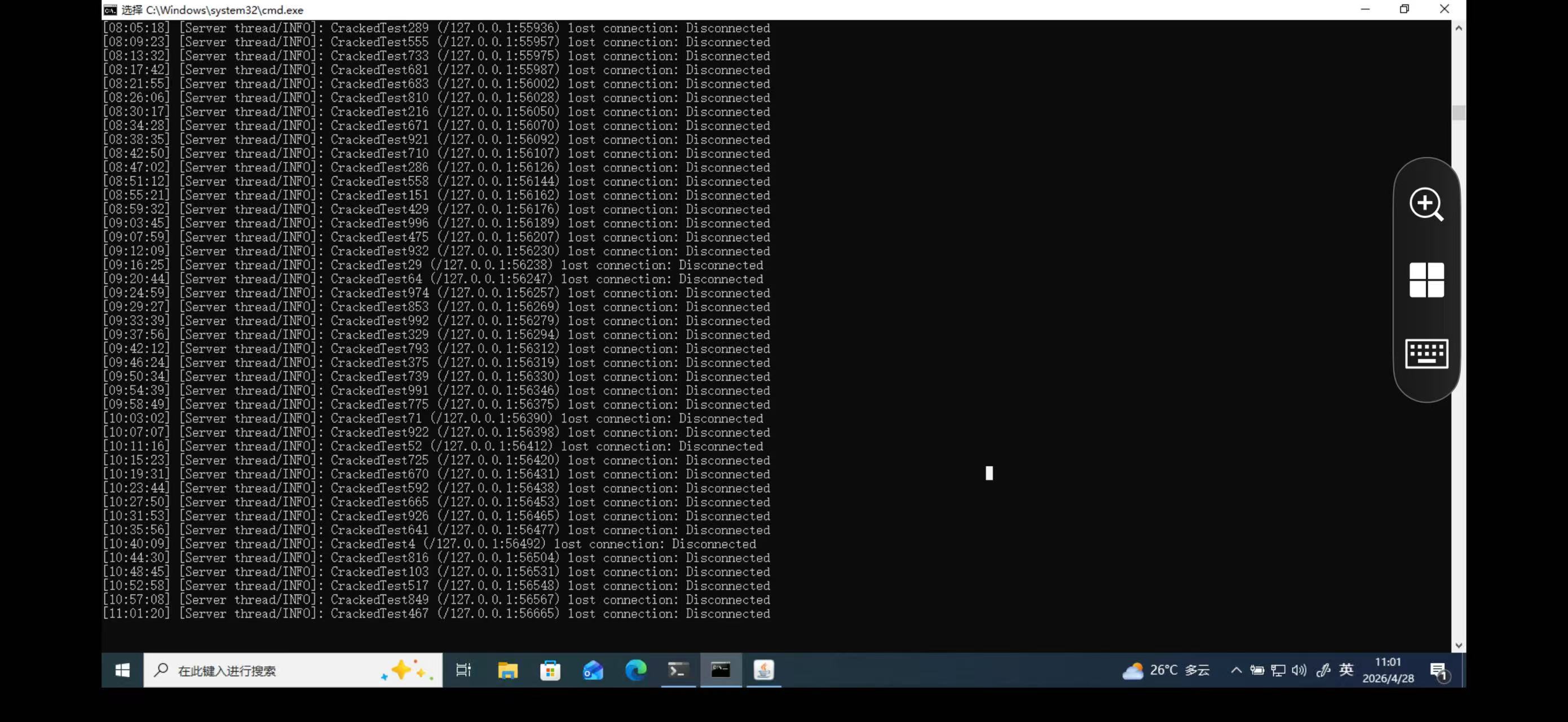
经过接下来的测试后就可以拿到真实ip,然后在vps上ban掉这个ip

bash
iptables -A INPUT -s 185.242.3.173 -j DROPFabric服务端
toml
serverAddr = "8.148.249.157"
serverPort = 7000

[[proxies]]
name = "mc-tcp"
type = "tcp"
localIP = "127.0.0.1"
localPort = 25565
remotePort = 25565
transport.proxyProtocolVersion = "v2"

[[proxies]]
name = "mc-udp"
type = "udp"
localIP = "127.0.0.1"
localPort = 24454
remotePort = 24454在frpc.toml的tcp这一行添加transport.proxyProtocolVersion = "v2" ,接着在服务器mod文件夹中加入proxy-protocol-support-1.1.0-fabric.jar这个mod
下载连接Proxy Protocol Support - Minecraft Mod
启动一次后config文件夹中会出现proxy_protocol_support.json,这个文件夹存储着
enableProxyProtocol
设置为 以启用模组功能true
- 默认:
true
proxyServerIPs
一份属于你受信任代理服务器的IP地址列表。这些IP的连接必须发送一个代理协议头部
- 默认:
["127.0.0.1"]
directAccessIPs
允许直接连接且无需代理协议头的IP或CIDR范围列表。这对管理员、本地网络玩家和服务器端工具来说非常理想
- 默认:
["127.0.0.1", "192.168.0.0/16"]
whitelistTCPShieldServers
当 时,模组会自动获取 TCPShield 的官方代理 IP,并将其添加到可信列表true proxyServerIPs
- 默认:
false
如果开启mod后像通过局域网连接,则需要在directAccessIPs加上你的局域网ip,例如
json
{
  "enableProxyProtocol": true,
  "proxyServerIPs": [
    "127.0.0.1"
  ],
  "directAccessIPs": [
    "127.0.0.1",
    "172.16.229.148",
    "172.16.0.0/12",
    "192.168.0.0/16"
  ],
  "whitelistTCPShieldServers": false
}